XLIFF 1.2 Import\Export\Content\Formatting Issues

Hello!

I’m experiencing some issues with (even simple) XLIFF 1.2 files that hopefully someone can help with please.

The following XLIFF 1.2 test file is imported into my project with the following unit defined…

  <trans-unit id="Automatic" resname="Automatic">
    <source>Auto</source>
    <target state="needs-translation">Auto</target>
    <context context-type="context">Abbreviated form preferred</context>
  </trans-unit>

But this results in the following in the editor…
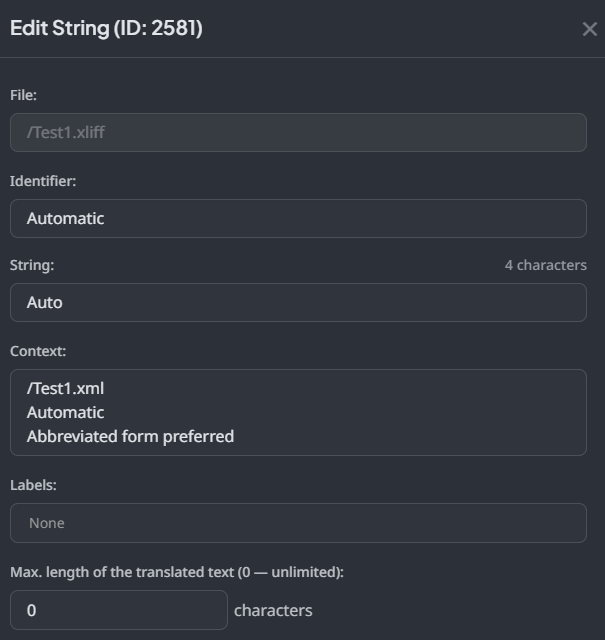
And when the file is exported as part of a bundle, the unit in the file now looks like this…

  <trans-unit id="2581" resname="Automatic">
    <source>Auto</source>
    <target state="needs-translation">Auto</target>
    <context-group purpose="information">
      <context context-type="source">/Test1.xmlAutomaticAbbreviated form preferred</context>
    </context-group>
  </trans-unit>

NOTE: It also exported the context with line breaks, which had to be removed for inclusion here.

So my questions are…

  1. Why has my own id been overwritten with a numeric one?
  2. Why has extra unnecessary information been added to the context?
  3. Why has the file format not been preserved (in that a context-group element has been added)

Any help would be much appreciated.

Kind regards, David
Hi David,

First of all, please let us know what is the point of using bundles in your case? I’ve checked your project and the translated file is exported (Downloading Translations | Crowdin Docs) the same as it is in your source file:

<body>
<trans-unit id="Automatic" resname="Automatic">
<source>Auto</source>
<target state="needs-translation">Auto</target>
<context context-type="context">Abbreviated form preferred</context>
</trans-unit>
</body>

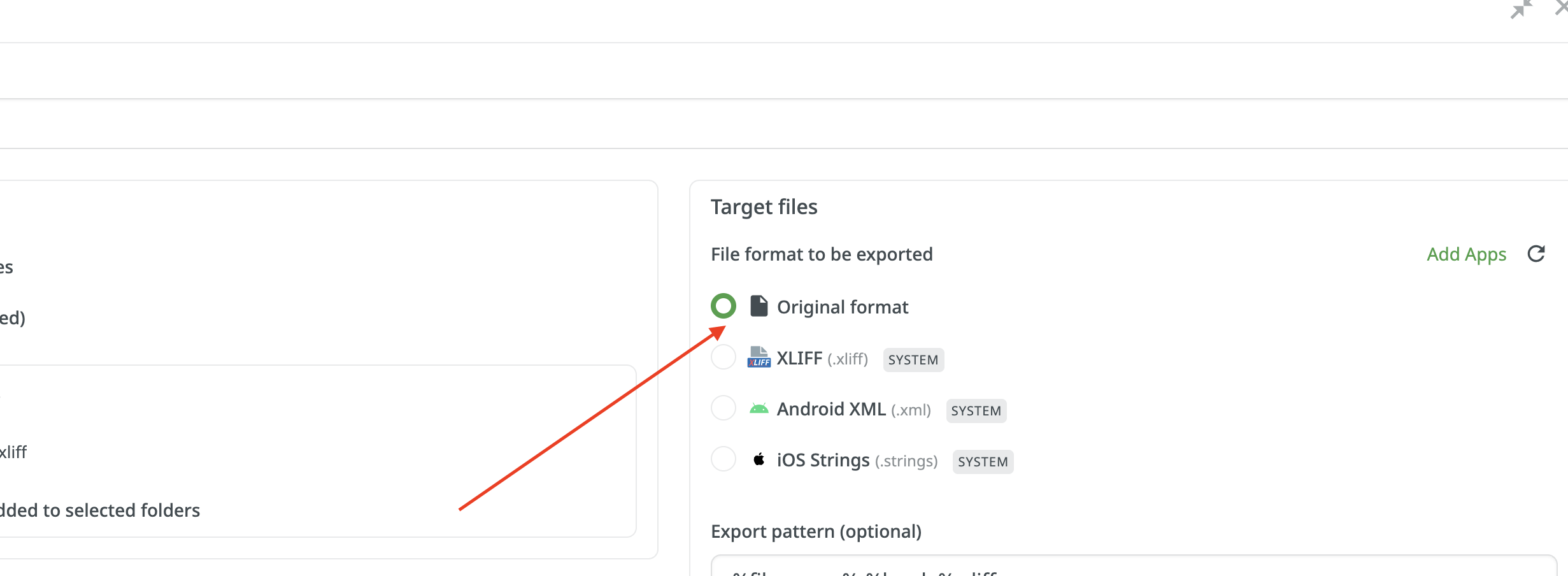
When configuring bundles, and you still need the file to be exported in the same format, please select the Original format option:

The thing is that when the XLIFF format is selected, the unique file and string IDs are assigned to each string by default. This allows matching the file in case translations should be uploaded later to the same file
There is a build-in feature already, that allows any file format to be exported as XLIFF without configuring the bundle:

1 Like

Hi Tetiana,

Thanks so much for the information, that’s really helpful.

So selecting the Export option creates an entirely new file based on its own logic. Where-as selecting Original Format will use the original file, but with translated text.

I’ve tested that and can confirm it fixes issues 1 & 3

As for bundles, this is just a test project and I wanted to see how that feature worked. I plan on supporting a number of languages in the future, so using bundles seems like the long term solution.

I tested both individual and bundle downloads and can confirm they’re now working as expected (as mentioned above)

Unfortunately issue 2 still persists as its the import process that appending the unnecessary information. Is there any way to avoid that please? I can edit this post-import, but I have many hundreds of strings that will require fixing.

Kind regards, David

Hi Tetiana,

I’ve been testing the entire upload, translate & download process from end to end and mostly have it working now. But I did encounter one other issue on the way.

So my workflow is basically this…

  1. Create\edit source files on local PC (checked into source control)
  2. Add\upload sources file to Crowdin
  3. Edit translations
  4. Download target files to local PC (and check back into source control)

I’m guessing that’s a fairly standard approach.

But one of my test scenarios failed, outlined below…

  1. Edit a context string in a source file (on local PC)
  2. Upload source file to Crowdin (it shows no updates in the stats window)
  3. The updated context does not show in the Edit Strings window, although it does when selecting Preview Source
  4. Download target files (using the Original File option) and the context is present and correct

So somehow the context is not being imported correctly when a source file is updated. Which means any context changes made locally have to be duplicated in Crowdin for any translators to read.

Hopefully there is a way around this or its something that could be addressed in an update?

Kind regards, David

UPDATE#1

Just seen this…

Key is appended to context (when importing a CSV file) - Crowdin Issues - Crowdin Community

Whilst this extra information is not added to export files, it doesn’t really help with context when translating (and just adds extra work imho)

If it’s intentional, it would be really helpful if it could be made configurable please.

Hello David,

Thank you for sharing your testing workflow and feedback.

Regarding your context not updating, Crowdin tracks strings by source text and key. If a file update only changes the context, the system does not overwrite the existing database metadata. To update context for an existing string, you can use the Editor UI or our API.

Regarding the key appended to the context, Crowdin displays the identifier as a visual aid to give translators structural clues; it cannot be toggled off right now.

I guess some visualization may be helpful here. For further assistance with your specific workflow, please send your sample files and a step-by-step video screen record of your process directly to our team at support@crowdin.com so we can take a closer look.

Hi Dima,

Thanks for the information, it’s much appreciated.

First off I should say that I’m a complete novice when it comes to the localisation workflow\processes, so it’s entirely possible I’m doing something wrong here.

But with regards to the context, I’m guessing it’s a vital piece of data for the translation process (and should be treated as such)

Let me try and explain my workflow and the issues in a little more detail…

  1. Source file (let’s say “Localisations-en-GB.xlf”) is stored locally (and under source control)
  2. Source file is imported to Crowdin
  3. es-ES translation added to Crowdin (using MT)
  4. Source & target files (“Localisations.en-GB.xlf” and “Localisations.es-ES.xlf“ are exported locally.

On the first import of a source file, the context is added to Crowdin, so far so good.

But if I edit a context in the source file (locally) and then re-import it, the context isn’t updated in Crowdin (and requires manually editing)

But the manually edited contexts (in Crowdin) aren’t included in the source & target files when they’re exported. To keep them in sync the edits (that were made in Crowdin) now have to be made in all the local exported files as well.

Further to that, subsequent exports will overwrite the local files and overwrite any previous edits. Which means each and every time I export, I have to re-apply all edits to all the local files. These edits will accumulate over time and it will create a huge amount of extra work.

Basically Crowdin does not allow for end to end support of context data, which seems odd considering its importance to the process.

As I said though, I’m new to all this so may well be doing something wrong here. The issues are easy to replicate though if you’d like to try.

If you’re able to raise feature requests, please could Crowdin considering the following…

  1. Add a setting to enable end to end support for context data (so what goes in comes out)
  2. Add a setting to enable the inserting of the file\key details to the context on import (default to true for backwards compatibility)

Hopefully that all makes sense, but let me know if not and I’ll try to explain further.

Kind regards, David

Hi Dima,

I’ve just seen the following export setting…

Save context information in the files

Context and max.length added in Crowdin will be visible in the downloaded files. This option is applied to specific file formats only.

Which is exactly what I’m after, but it looks like XLIFF doesn’t support this? (which seems like an unusual choice if so)

Kind regards, David

Hi @PeachyPixels !

Context is an important part of the translation process, so your expectations make sense. Regarding the setting you mentioned:

“Save context information in the files”

You’re correct, this is the option that controls whether context added in Crowdin is included in exported files. However, this option is only supported for CSV, Android XML, iOS strings, and RESX formats, and unfortunately, XLIFF is one of the formats where support for context is limited.

I completely understand your point about end-to-end consistency. At the moment, full round-trip synchronization of context data for XLIFF files is not guaranteed, but your suggestions around improving this (especially preserving context both ways) are very reasonable. I’ll pass this along to the team as a feature request.

Will keep you posted about it!

@PeachyPixels, just to make sure your use case is accurately captured for the product team, could you tell us a bit more about the bigger picture - what you’re building and how the XLIFF files fit into your overall workflow beyond Crowdin? And the reason why it is necessary to have context in the exported file itself, for example, do other tools or team members rely on reading it from the file?

I’m asking because Crowdin also offers other ways to provide context to translators beyond text in the file itself, such as screenshots, in-context previews, and string-level comments - which tend to be more reliable and don’t depend on the export format.

We’d love to understand your setup better to see if there’s a smoother path for your workflow overall :folded_hands:

1 Like

Hi Sofiia,

Many thanks for the replies.

I suspect (as an indie dev new to localisation) my workflow might be a little different than larger teams.

For me having a local set of (platform agnostic) files that are under source control is most important. The XLIFF standard allows for this and is widely adopted, which is why I choose it.

As for my workflow, elaborating a little on what was said before…

  1. My source files (English) are stored locally and are under source control. These files include unit text, context, state & do not translate etc.

  2. The (English) source files are imported into Crowdin

  3. Translations for supported languages are added\verified (by MT and proof-readers) as well as context & state updates.

  4. Updated source and new target files are exported locally (overwriting existing versions) and committed to source control

So as you can see, having all data in the source files (along with any edits made in Crowdin) carry through to the export files is vital.

Hopefully that gives you a little more context and helps?

That said… does Crowdin carry through the note element to the export file instead of context? If so, that would definitely help (assuming the note data is used for context when working with MT’s)

Kind regards, David

1 Like

Hi David,

Thank you for the explenation! Let us please consult with our tech team regarding this!

We will update you once we have some news!

2 Likes

Hello David,

Thank you for sharing more details about your goal to store these specific files locally.

I’ve checked with the team, and since the native platform export does not currently retain that specific structural metadata just for storage purposes, the most effective workaround is to handle the XLIFF construction on your end.

You can easily achieve this by using our Crowdin JS API Client, which gives you complete programmatic control over how the translation data is pulled and formatted into your XLIFF files.

To set this up quickly, you can use an AI coding assistant. An AI agent can help you write the necessary script in no time using our API documentation, allowing you to generate the exact XLIFF structure you need without spending hours on manual custom development.

1 Like

Many thanks Tania & Dima.

Kind regards, David