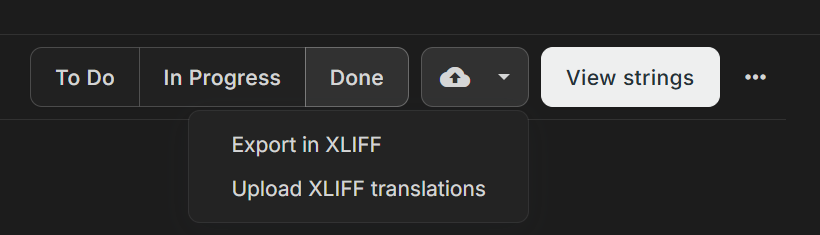
In a Crowdin task, it is possible to export and upload translations in XLIFF 1.2 format using these buttons:
Is it possible to have these buttons support XLIFF 2.x format?
In a Crowdin task, it is possible to export and upload translations in XLIFF 1.2 format using these buttons:
Is it possible to have these buttons support XLIFF 2.x format?
Hi @jamjamcg, worth separating two different things here, because they’re often confused.
The XLIFF in a task (Export in XLIFF / Upload XLIFF translations) isn’t a general-purpose export. It’s a round-trip envelope for offline translation: it carries the project, file, and string identifiers, which is why the upload only accepts a file that was downloaded from that same task. Both ends of that exchange are Crowdin, and the file is only ever passed through your CAT tool in the middle. XLIFF 1.2 is used there deliberately, because it’s the version every CAT tool reads reliably — so this one isn’t planned to change to 2.x.
If you need XLIFF 2.x for an actual export, that’s a different mechanism and it’s already supported. Crowdin can export your content as XLIFF regardless of the original source format, with a selectable version — see the XLIFF and XLIFF 2.0 string exporters. Those produce standard XLIFF files intended to go out to external pipelines, so 2.0 makes sense there.
So the short version: task/offline XLIFF stays at 1.2 by design, and XLIFF 2.x is available through the string exporters.
Given that the most commonly used offline translation tools (Trados Studio and memoQ) fully support XLIFF 2.0, wouldn’t it be a good idea to make the XLIFF version selectable in the task/offline process?
Hi @peterkahl
You’re right that both tools handle 2.0 well. The reason we keep 1.2 there isn’t tool capability though: the file a task produces is an internal transport format rather than a deliverable, and 1.2 is the one version that every tool in that chain reads identically.
For cases where the XLIFF version itself matters, please use a bundle instead: bundles let you export your content in a chosen format, including XLIFF, no matter what your source files are, through the XLIFF String Exporter.