Hi,
While working on Arabic translations for the uBlock project, I noticed an unexpected behavior with some strings.
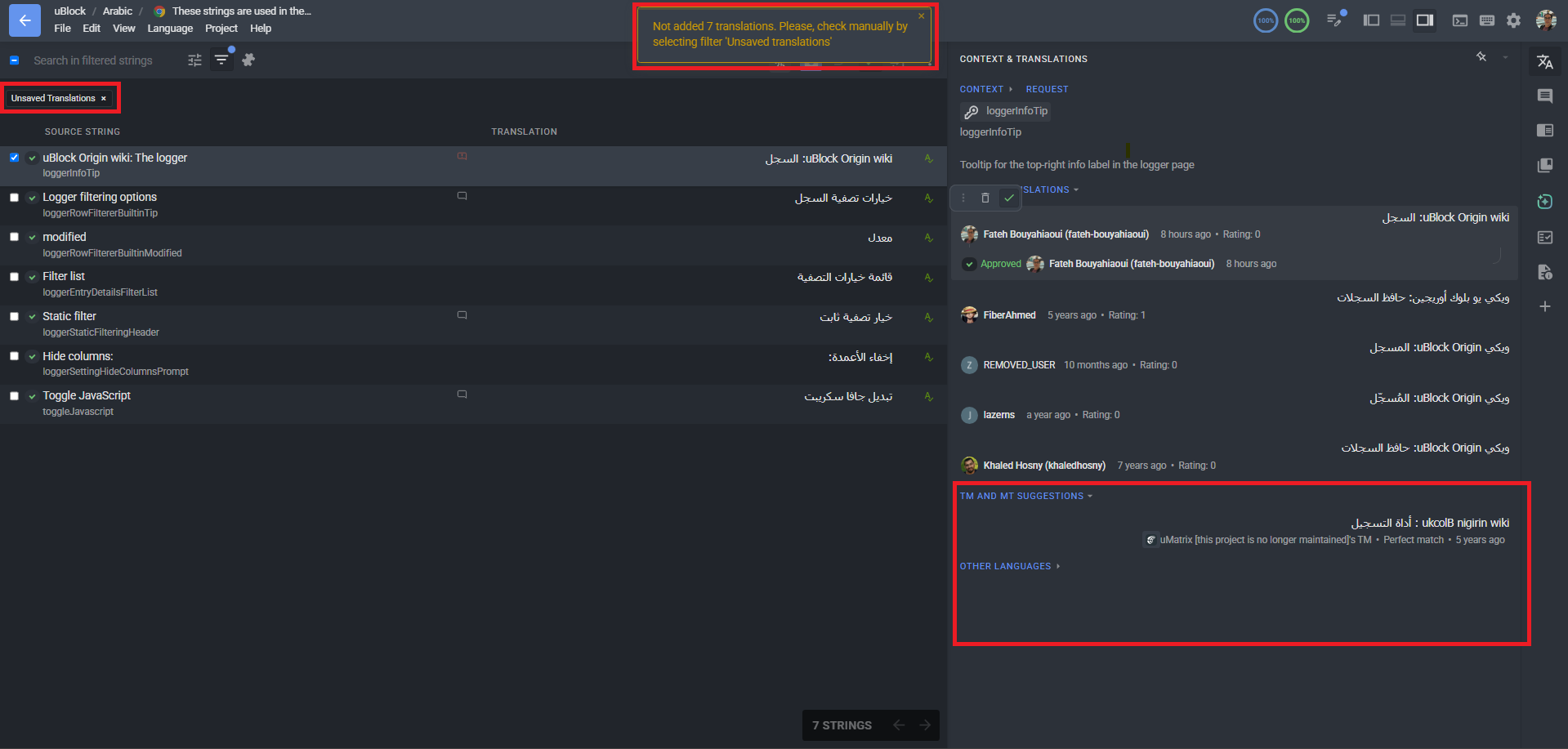
When I try to edit an existing translation and save it, I get a “Duplicated translation” error — even though the new translation is different from the existing one. The original translation disappears from view, and the string appears under “Unsaved translations” with no way to save it directly.
The workaround I found is: delete my suggestion → approve the existing translation from the interface → rewrite it. This is time-consuming and unclear.
This seems to happen specifically with strings containing “filter/filtering” terminology.
Example string for reference:
Is this a known behavior or a bug? Any clarification would help.
Thank you
Hi @fateh-bouyahiaoui
The “Duplicate translations” error indicates that the same suggestion has already been submitted and is currently present in the TM and MT suggestions lists. You are welcome to review the string suggestions by scrolling, and select the needed entry as translation
To clarify: the issue is not about selecting an existing suggestion. I am adding a new and different translation that does not exist in the suggestions list. Despite this, the platform rejects it as “Duplicated translation” and classifies it as “Unsaved translations” — even though no identical translation exists.
Is this a known platform behavior, or could it be a bug?
Please check the suggestions from other users in the Editor (sorry, I am not familiar with Arabic). If the same one is already added, it will not be added again. The system will not allow you to save the same translation. You may only vote for it or approve it.
Please let us know if you have any additional questions!
Thank you Tania. I am aware of how the platform works.
What I reported is different: a brand new translation, not present in any suggestion list, was rejected as “duplicated.” This is not expected behavior. Case documented.
From the screenshot you shared, it looks like you are trying to save the same translation that is already saved and approved for the string. That’s why the system does not allow saving it again. Perhaps we misunderstood something, and you could record a short video of your steps and send it to support@crowdin.com?