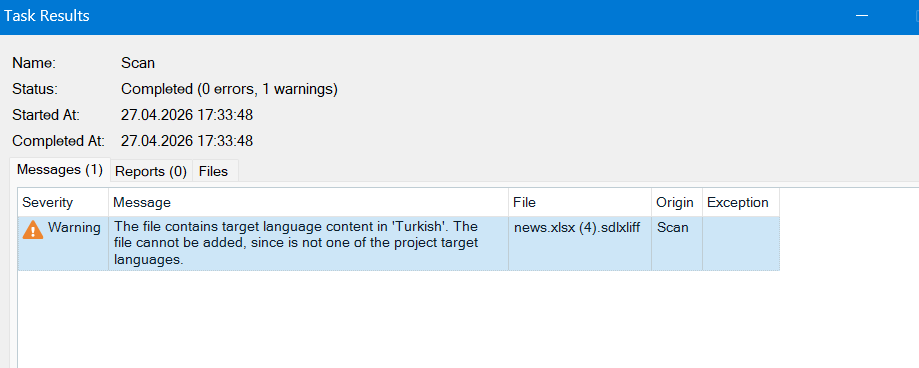
I’ll report a bug. After I complete working on a sdlxliff file (English (United States)->Turkish (Türkiye)) on Crowdin, then I upload it to Trados, Trados fails to open that file. The reason behind this is that in Crowdin Project English (United States)->Turkish (Türkiye) can’t be opened. Only English (United States)->Turkish can be opened. Probably this causes mismatch. So would you mind fixing this by adding a target language as Turkish (Türkiye) as in the Trados. Then probably it will be fixed. Thank you.
Hi @okansali
Trados is rejecting the file because it expects the specific locale code for Turkish (Türkiye), which is usually tr-TR, but Crowdin exports it using the standard Turkish code tr by default.
We do not need to add a new language to fix this. You can easily solve it using the Language Mapping or a custom export pattern. Here you can find the versions of the Turkish code we provide:
With a mapping, just go to your Project Settings, navigate to the Languages section, and find Language Mapping. Locate Turkish and change its export placeholder code to tr-TR.
If you want a quick fix for the file you already downloaded, you can open the sdlxliff file in a text editor and manually change the target-language tag from tr to tr-TR near the top of the file.
Please also take a look at this app:
The Trados app is a direct API integration. It is designed to completely automate your workflow. Instead of you manually downloading an sdlxliff file from Crowdin and opening it in Trados, this integration automatically sends your Crowdin content directly into your Trados projects for translation and pulls the finished texts back into Crowdin.
Thank you so much for your help.
1 Like