Hi,
I’m the manager of a translation project, and I struggle to understand some key concepts with the Glossary :
I’ve read about the difference between concepts and terms on the Crowdin documentation, and still, I’m wondering if “Terms” which are not in the source language are just the translations of the concept / source language term ?
On the same related topic, would it be possible to only allow contributors to enrich the glossary with terms only, with full permissions or as draft, as it is possible to do now, but without the possibility to add concepts into the glossary ?
I vividly remember that there was a parameter on the previous project I worked on to only let proofreaders modify the glossary. However, when I checked the parameters of the actual project, there wasn’t anything like it, only allowing any contributor to submit draft or fully edit the glossary.
If it does, When does the glossary translate app “file” synchronise with the actual crowdin glossary ? I’ve done a substantial edit a week and four hours ago, and yet, there hasn’t been any chance to the app.
Are there any criterias for synchronisations I’m unaware of ?
Regarding your first question, you are right. In Crowdin, a concept is the abstract container for an idea, and a term is the actual word used in a specific language. When contributors add a target term to an existing concept, they are simply translating the source term.
To stop translators from creating new concepts from scratch, you can disable the option to allow project members to manage glossary terms in your project settings. This locks out regular users from creating concepts:
If your previous project let you do this more specifically, you were likely using Crowdin Enterprise, which allows more flexible glossary management permissions.
As for the Glossary Translate app, it doesn’t maintain a live background sync. And, for synchronization, it should be working properly as well.
Please contact us directly (support@crowdin.com) so we can check the app configuration via our database and tell the exact reason for this
Hi, reaching out again for another question I had on the same broader topic.
Let’s say I have a concept revolving around a particular type of bug : The seven-spot ladybug.
I therefore create a concept, define it, add some reference, and 4 english terms :
C-7, the acronym
Ladybug, the short form
Seven-spot ladybug, the long form
Is there a way for translators to individually access those terms for translation, in any non-source language ? Or do they need, if allowed, to create the same variations within the concept by editing the glossary ?
If they aren’t allowed to modify the glossary, even by suggesting drafts, would creating a new concept for each of those variations the best workaround here ?
I can clarify exactly how this works in Crowdin. Since glossaries are concept-based, translators need permission to edit the glossary if they want to manually open a concept and add their own target variations, such as acronyms or short forms. If they lack edit permissions, they cannot add those terms through the standard glossary UI.
However, please avoid creating a separate concept for each variation. Doing so breaks the fundamental structure of concept-based terminology and will cause duplicate, confusing glossary highlights for your translators in the editor.
The absolute best solution is the Glossary Translate app you mentioned in your topic title. This app is designed specifically for this scenario. It extracts your glossary, including all those source variations, and converts them into a standard file within your project.
Your translators can then translate each variation individually in the regular editor, just like normal strings. They will not need any special glossary management permissions. Once translated, the app automatically syncs those translations back into your glossary, correctly assigning them as target terms within that single original concept.
So… Another issue. In the Rogue Core Project, I’ve manually added variations of a concept, a fancy name for a tutorial :
PCAA is the acronym
Post-Cryonic Aptitude Assessment as the short form
Post-Cryonic Reorientation Aptitude Assessment as the long form.
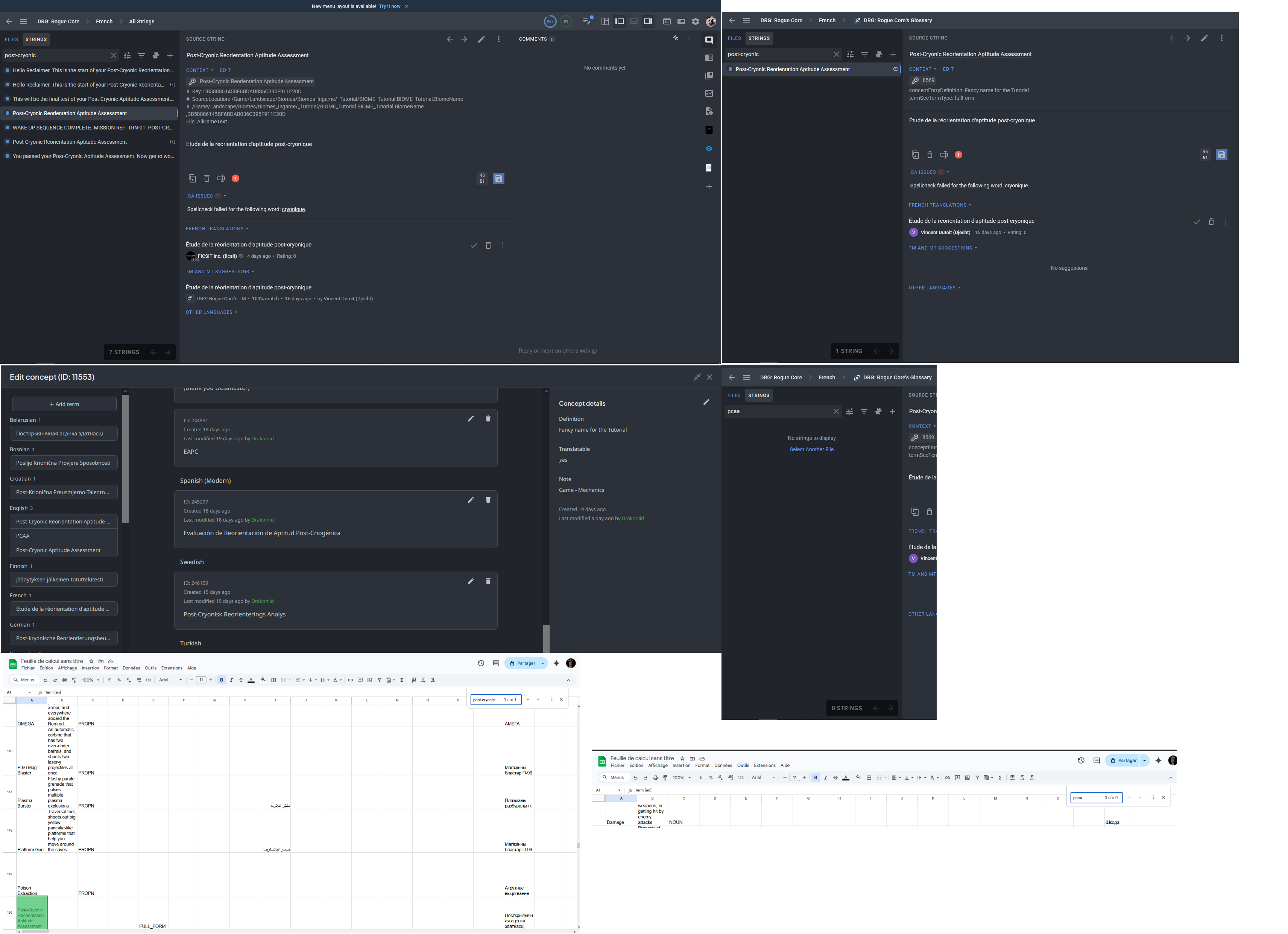
The glossary, in the glossary tab in crowdin, contains those three entries, as can be shown in the horrendous patchwork of screenshots linked below, but also, as is shown, the exported glossary in a .xlsx file doesn’t find the short form, or the acronym, and the glossary translate in the editor doesn’t have those strings either.
This is not an isolated case, and it happens with almost every variation that we have. Any remedies for that issue ?
When you add multiple variations (like acronym, short form, and long form) under the same concept, they are treated as part of a single concept entry rather than fully independent glossary terms for matching. Glossary entries in Crowdin are concept-based.
To make all variations reliably available in the Editor and exports, the best approach is to create them as separate glossary entries, rather than grouping them under a single concept.
I understand this may feel redundant, but currently, it’s a reliable way to ensure all variants are recognized and suggested during translation.