Feature Request: Mandatory String Type Labels next to String Identifiers

Hi Community,

The Problem

When translating UI strings, the most frequent blocker is not the language itself — it’s the lack of context about WHERE and HOW the string is used. A single word like “Set”, “Send”, or “Type” can be a button label, a confirmation message, a placeholder, or a section title, and each case requires a completely different translation in many languages (grammatical form, verb vs. noun, imperative vs. past tense…).

Currently, translators rely on string keys (e.g. unlockPinSet) to guess the context, post comments and wait for answers. Project managers are often under heavy workload and cannot realistically respond to every context question from translators across 50+ languages. The result: guessed translations, QA issues discovered months later, and thousands of accumulated unanswered comments across projects.

The Proposal

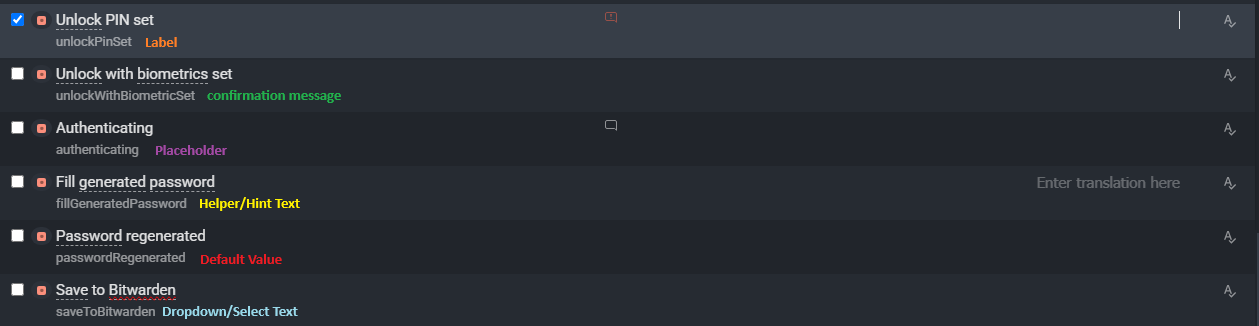
  1. String Type label displayed next to the string identifier, with distinct colors for instant visual recognition. Suggested types:

    • Label
    • Button Label
    • Placeholder
    • Helper/Hint Text
    • Confirmation Message
    • Error/Validation Text
    • Default Value
    • Dropdown/Select Text
    • Tooltip
    • Page/Section Title
  2. On the source side: a mandatory dropdown (or checkbox list) for the developer/content owner when uploading or creating strings, to select the appropriate type, with the freedom to add a custom type or an additional note, and the ability to edit it later.

  3. For existing projects: a default “Unclassified” value with a subtle warning indicator, so backward compatibility is never broken.

The Impact

  • Translators: instant context = faster, more accurate translations from the first attempt.
  • Proofreaders: approve with confidence instead of re-guessing the original intent.
  • Project managers: a massive reduction in context-related comments and questions.
  • Developers: two seconds of classification at the source saves multiplied hours across every target language.
  • Crowdin: better translation quality across all hosted projects, and fewer stale unanswered comment threads.

This small metadata addition would solve the single biggest source of translator questions, and save thousands of work hours across the platform.

*** A note on where this is posted: We are intentionally submitting this through the Crowdin Community portal rather than the general feature-requests board, as it seemed the most direct path to reach the team — the general board contains a large backlog of suggestions, and we believe this idea deserves urgent consideration if approved and not already proposed. No disrespect intended to the Community guidelines — we simply want the idea to be seen.

Thank you for considering this request!

Note: The strings shown in the attached image are just sample examples used to illustrate the idea.
Hi @fateh-bouyahiaoui

Thank you so much for taking the time to share such a detailed and thoughtful proposal! We totally get why you wanted to share this directly with the community to ensure it didn’t get lost. That said, I’ve shared your proposal with the team for future improvents.

Thank you again for caring so deeply about improving the platform!

Thank you Iliana! We’re really looking forward to seeing this feature ( or something similar ) come to life on the platform. It would make a real difference in the daily workflow for translators and proofreaders across all projects.

We’re happy to help with any further input if the team needs it. Thanks again for passing it along!

Hi Fateh,

Missing context is the biggest source of translator questions and guessed translations. Where we would steer the solution a bit differently is the source: a fixed type label captures one dimension (button vs. placeholder vs. title), but the richest, most reliable context comes from the place that already knows it - your codebase and your developers :light_bulb:

That is exactly what the new Crowdin CLI context commands are built for. You can download strings to a local JSONL file, have an AI agent (the same one your devs already use) read the code, write a concise 1-3 sentence description explaining the UI element and its placement, then upload it back. Full walkthrough here:

A few things this unlocks that go beyond a type dropdown:

  1. It captures element type AND placement, constraints, formatting - not just a single category.
  2. It can run automatically in CI, so new strings get enriched on every push with zero manual classification.
  3. You can filter by status (only strings missing context), file, label, branch, or date, so you enrich incrementally. Crowdin context status gives you coverage stats per file, so you can see where context is thin.

On making context mandatory: we are working on automated context-sufficiency checks that will flag strings whose context is too weak, which gives you the enforcement layer your proposal is reaching for, without forcing developers into a rigid dropdown at creation time.

Would love to hear how the CLI workflow fits your setup. Happy to help you wire it into your pipeline :books:

Hi Dima,

Thank you so much for the detailed explanation and the resource!

We’re genuinely glad to hear Crowdin already has such an advanced CLI + AI Agent solution for context enrichment. We hadn’t tried it yet, but we’ll definitely give it a go at the first opportunity.

A bit about our setup: we work with the help of several tools and AI agents, and we’re actually preparing a local agent for translation work that should be ready before the end of the year.
Now, we don’t have a pipeline/codebase infrastructure of our own to wire the CLI into, our role is purely on the translation/proofreading side.

And regardless of how advanced the tooling gets, we believe the human factor remains essential for the final call, especially for languages like Arabic, French, or German, where grammatical gender, plural forms, and other linguistic rules add a layer of nuance that’s hard to fully automate.

On our original proposal: we actually think it complements the CLI approach rather than competing with it. No one understands the real context better than the dev/team who wrote the code. so a simple type label is essentially giving the CLI/AI Agent a “Braille map” of where each string lives and how it’s used, without needing to dig through the codebase. That should make the AI’s job faster, more productive, and with less guesswork.

One more idea along the same lines: this could potentially work as a VS Code / Visual Studio plugin, something that recognizes a string while the developer is writing the source code, and suggests/pre-fills the matching type automatically when syncing to Crowdin via CI/CD.

Manual override would of course always remain an option for the developer.

Thanks again for engaging with this so thoughtfully, really appreciate it!

Hi Fateh,

Thank you for taking the time to share more details about your workflow and your perspective on the importance of human involvement in the translation process.

I’ve forwarded your additional feedback, including the VS Code / Visual Studio plugin concept, along with your original proposal to our team for review and consideration.

We truly appreciate your insights and the thoughtful ideas you’ve shared. If you have any further questions or suggestions, please don’t hesitate to reach out!

1 Like

Hi @Dima,
we wanted to follow up on our earlier proposal. Since submitting it, we’ve continued working on the project and have now experienced firsthand (through active proofreading) just how much inconsistency a lack of string context creates across contributors.
It really reinforced why we felt this feature matters.
Is there any update or direction from the team regarding the proposal? We’d love to know where things stand.

Hi @fateh-bouyahiaoui

Our team is still thinking about the best possible way to improve it. Please be sure your feedback is not lost or forgotten.

We’ll let you know if the product team decides to implement the new feature you proposed.

Thank you, Dima.
We appreciate the update and glad to hear it’s still being considered. We’ll be here following up, and happy to provide any additional real-world examples if they’d be helpful to the team.

1 Like

Hi, the team agreed that this may be an interesting feature. We’ve added it for further review, and (hopefully) there’s a possibility of future implementation (CN-66653)

Thank you,

Looking forward to seeing both features evolve.