I have one project where “Download as Zip” brings a zip file and inside this zip file I have one folder per language (as expected). I created a second project and uploaded the same source file but in this second project “Download as Zip” is not creating the folder per language. I compared the projects and I could not find any difference in any of their configs.
What am I doing wrong in the second project? What am I missing here? Thanks in advance!
Hi @Joao.Reigota,
It seems the CSV file was uploaded as a multilingual file (a separate language in a separate column) in one project, and the other one as a bilingual file in another projet. Also, the files have different export paths. You can check it in the Sources tab → double click on the needed file. Both these settings affect the export.
Could you please check it on your side?
Hi @TaniaM,
In both projects the field “Resulting file after translation export” was, originally, empty. I tried set it to “%language%/%file_name%.%file_extension%” in both projects and the one that was working is still working and the one that is not working is still not working, like if I had done nothing.
I just download both csv’s to compare and they are absolutely identical in terms of columns (and data)
Hi @Joao.Reigota,
The source files may be the same, but they have been configured with different schemes in the project. One is configured as multilingual, and the other is configured as a bilingual file (source language + one target language in a separate file). Thus, you need to change the scheme of the file in the project by going to the Sources tab → three dots next to the file → Change scheme. In the scheme configuration, you need to select one column for all translations (the multilingual spreadsheet option should be disabled):
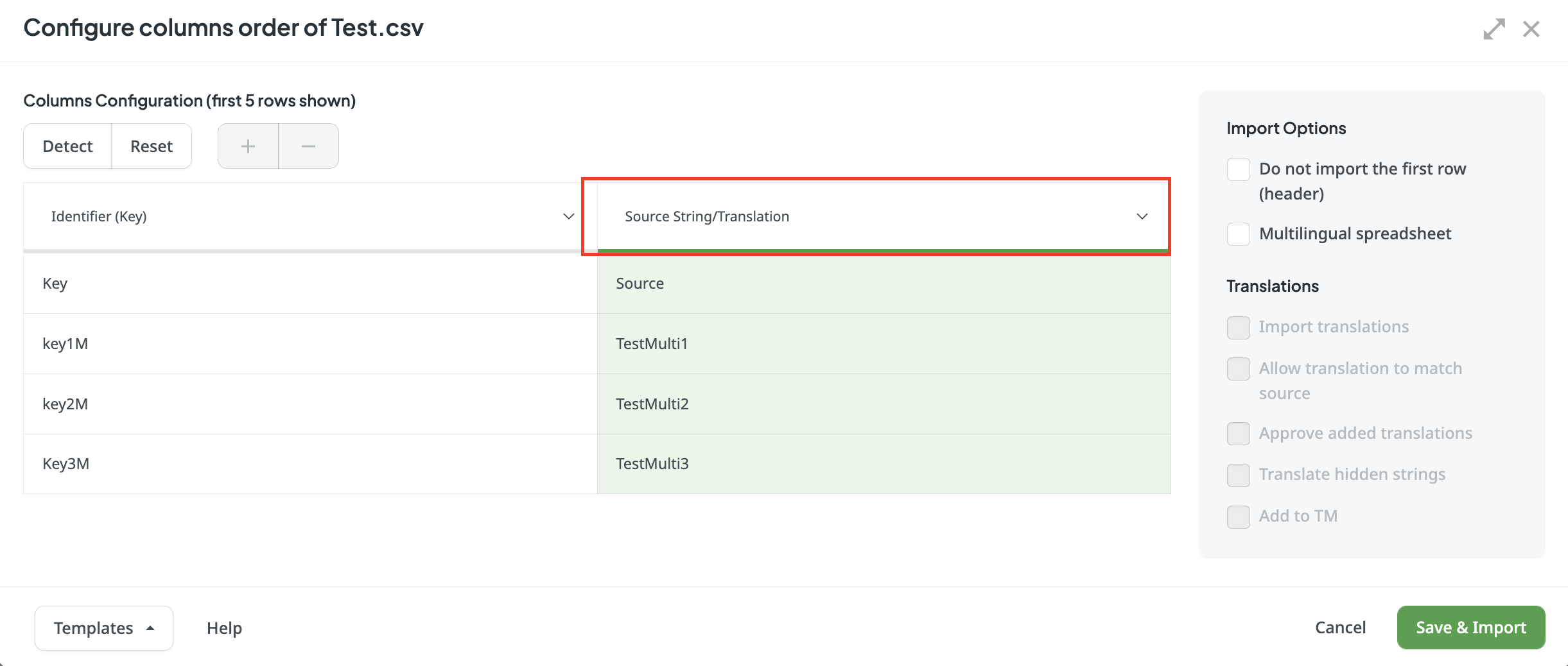
As a result, you will have a separate file for each target language.
Here you can find some more info on the CSV/XLSX file configuration: