Crowdin export issues: unexpected red/blue highlight for segmented paragraphs from Redmine

Hi Crowdin Members,

We’re experiencing an issue when exporting content from Redmine into Crowdin:

  1. We insert two line breaks in Redmine, resulting in two paragraphs wrapped in <p> tags.
  2. After export into Crowdin, certain segments, located in different parts of the article, are unexpectedly highlighted in red and blue.

Could you please advise:

  • Is this normal behavior?
  • What mechanisms cause the coloring of these segments (e.g., internal diff/highlight logic, formatting parser)?
  • Which Crowdin settings or configuration options should we inspect or adjust to prevent or resolve this issue?

I’ve attached a short video demonstrating the problem.

Thank you for your assistance!

Hi @vasili.krez

The behavior you’re observing is indeed expected. This is a feature of the Crowdin Online Editor designed to provide a visual indication of the translation status of your segments.

As explained in our documentation here, the string status is indicated by the following colors:

  • Red: Indicates that the segment is untranslated.

  • Blue: Indicates that the segment has been translated.

  • Light-green: Indicates that the segment has been approved.

  • Gray: Indicates that the segment is not for translation.

  • An active string (the segment you are currently working on) is highlighted in yellow.

These color highlights help translators and project managers quickly assess the progress and status of translations across the page.

If you prefer to disable this highlighting for a cleaner view, you can adjust this setting directly within the Editor:
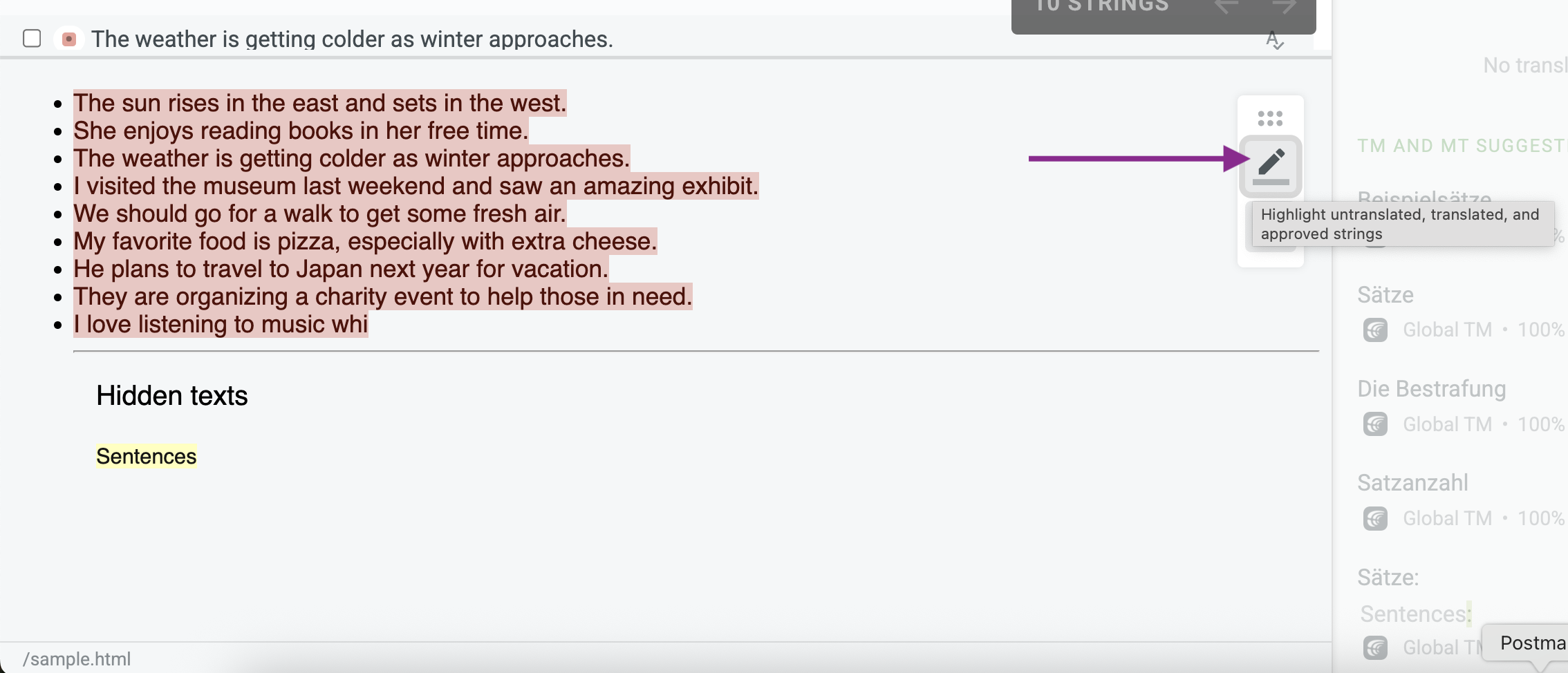
I hope this clarifies the behavior and helps you manage your content in Crowdin more effectively!