Android exporter ICU placeholder

Hello there,

We are currently using a single .csv on crowdin for translations and we would like to use them for multiple platforms with placeholder and plurals.

It looks like they are correctly detected by crowdin. In the settings for “import” we have activated the “Unify placeholders”.

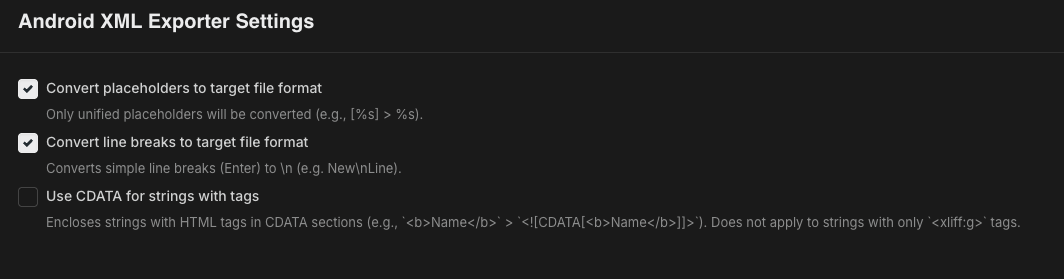
Since we want to download the translations with the CLI, I created a bundle. The bundle has only the android exporter enabled. For the android exporter I have the following settings.

But when I download the xml the placeholder and plurals are not generated.

Same behavior applies if we export for iOS. We are now not really sure if this even works as we think it should.

Hello @andreas-umbricht,

Thanks for the detailed screenshots — that made this quick to diagnose. What you’re seeing is expected, and it’s two things at once:

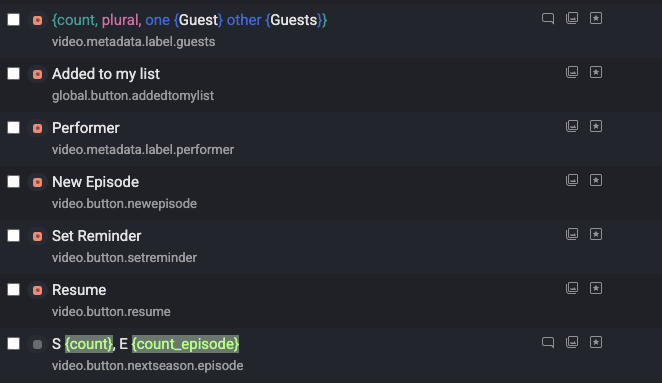
1. ICU tokens aren’t “unified placeholders.” Unify Placeholders and the exporter’s Convert placeholders to target file format only handle sprintf-style tokens (%s, %d, %@, %1$s) — the tooltip on your screenshot spells this out: "Only unified placeholders will be converted (e.g., [%s] > %s )." ICU tokens like {count} and {count, plural, one {…} other {…}} are highlighted in the Editor as recognized placeholders, but they aren’t part of that pipeline, so they’re written to the Android/iOS output as literal text.

2. CSV cells are single strings, not plural entities. For the exporter to emit a native <plurals> block (Android) or .stringsdict/.xcstrings entry (iOS), the source string must exist in the project as a plural string with distinct forms. A CSV cell containing ICU plural syntax is stored as one flat string, so there’s nothing for the exporter to build plurals from — same reason iOS behaves identically.

What works:

  • Non-plural placeholders (e.g. S {count}, E {count_episode}) → replace with sprintf tokens like S %1$d, E %2$d in the source; Unify Placeholders will then convert them correctly per platform on export.
  • Plurals → the source needs a plural-capable format (Android XML <plurals>, iOS .stringsdict/.xcstrings, ARB, gettext PO, or XLIFF plural groups). One such source file still fans out to multiple platforms via a bundle — that’s the pattern in Mobile Apps Localization and Target File Bundles. Plurals can also be authored directly via String Management → Adding Strings.

@Viacheslav Thanks for the quick response!

We are currently a bit lost then on how to approach the problem we want to solve with Crowdin. The pipeline we try to create is at follows:

  1. UX creates strings inside Figma and exports them with the Crowdin Figma plugin. This will create the CSV source file.
  2. Translators translate the source file
  3. We can export the translation bundles (with placeholders and plurals) for Android, iOS, Web (JSON) as well as a server environment (JSON) that also returns some of the strings back to the frontend.

As far as we understood, the Android and iOS export require the sprintf notation. But for the Web and server environment it should be ICU strings. We thought that this was achievable with a single source file, but as you have responded, they seem to be mutually exculsive.

How can we accomplish then our desired goal of having a single source file from Figma for all exporters? (Preferably without writing a custom exporter)
@andreas-umbricht,

Good news — you don’t need a custom exporter to get to a single source of truth, but the trick is to move the plural/placeholder structure out of the CSV cell and into Crowdin itself. Here’s the shape that works with what’s already available:

1. Use a string-based project and the Figma plugin as the source of truth (not the CSV file).
In a string-based project the Figma plugin pushes each Figma text as a first-class Crowdin string. Plurals are supported directly in the plugin: the current Figma text becomes the other form, and you add the remaining CLDR forms (one, few, many, …) via the string settings in the plugin. See Figma Plugin and String Management → Adding Strings. Once plurals live in the project as plural entities, the Android bundle exporter emits native <plurals> and iOS emits .stringsdict/.xcstrings — no ICU text stranded inside <string> tags.

2. Use sprintf-style placeholders ( %s , %d , %1$d ) in the source, not ICU {count} .
Combined with Unify Placeholders on, the Android/iOS bundle exporters will convert them to each platform’s native form automatically — that’s exactly what the tooltip on Convert placeholders to target file format describes. ICU-style {…} tokens don’t go through this pipeline, which is why your current export leaves them literal.

3. For the Web / server JSON targets, add one small build-time transform.
Crowdin doesn’t cross-convert sprintf :left_right_arrow: ICU between exports, so the honest recommendation is a tiny script in your CI/CD that takes the JSON bundle output and rewrites the placeholder shape for your ICU consumers. It’s a few lines and stable — much less work than a custom exporter, and it keeps a single source of truth in Crowdin. See the JSON options in the bundle format settings under Target File Bundles → Configuring Format Settings and the broader single-project multi-platform pattern in Mobile Apps Localization.

Net effect: Figma → Crowdin (string-based, plurals as entities, sprintf placeholders) → bundle → native Android <plurals>, native iOS .stringsdict, JSON for Web/server (with a small placeholder transform for ICU runtimes). No custom exporter, no per-platform source files.
